Table of contents
Which way fits you
- A plain link if you only need a "Message us on WhatsApp" line in your contact page, footer or bio. Nothing to install.
- A small HTML button if you want a button that stays on screen and you can paste code into your site.
- A widget if you want to change the design without code, greet visitors, show your opening hours or offer more than one contact.
Owners often recommend the plain link to each other first, and it is a good place to start, because the other two build on it.
Way 1: a plain wa.me link
WhatsApp's click to chat page gives the format: https://wa.me/ followed by your full phone number in international format, without zeros, brackets or dashes. Its example of what not to use starts with a plus sign, so leave that out too.
https://wa.me/15550100123
To fill in the visitor's first message, add ?text= and the message, URL-encoded:
https://wa.me/15550100123?text=Hi%2C%20I%20have%20a%20question%20about%20an%20order
The visitor still has to press send. The text only sits in the message field.
Paste the link wherever your site lets you add a link: a menu item, a button block, a footer line. Our click-to-chat link guide covers number formats by country and how to encode line breaks, so we will not repeat it here.
If you also print the link on packaging or a shop window, the contact QR tool turns it into a QR code.
Way 2: a small HTML button
This is the same link, styled as a button that floats in the bottom right corner. Replace the number and the message, then paste it just before </body> in your site's HTML, or into a custom HTML block if your site builder has one.
<a
  class="wa-chat"
  href="https://wa.me/15550100123?text=Hi%2C%20I%20have%20a%20question"
  target="_blank"
  rel="noopener"
  >Chat with us on WhatsApp</a
>

<style>
  .wa-chat {
    position: fixed;
    right: 20px;
    bottom: 20px;
    z-index: 1000;
    padding: 12px 18px;
    border-radius: 999px;
    background: #25d366;
    color: #0b141a;
    font:
      600 16px/1.2 system-ui,
      sans-serif;
    text-decoration: none;
    box-shadow: 0 2px 8px rgba(0, 0, 0, 0.2);
  }
</style>
To place the button inside your page instead of floating it, delete the four lines from position to z-index.
The button uses text, not the WhatsApp logo. WhatsApp offers its own "Chat on WhatsApp" button images in green and white, in three sizes, on the same help page. It asks you to use them as they are, without changes, and says they are only available in English. If you want the logo, use those images and read Meta's WhatsApp brand resources first.
What this button cannot do: it shows the same thing at 3 am as at noon, it has one number, and changing it means editing code again.
Way 3: a widget
A widget is a script you paste once. You then change the button from a dashboard, without touching your site again. When a visitor taps it, our widget opens a WhatsApp chat with your number, so the conversation still happens in WhatsApp.
One difference from a plain link: the widget adds a short reference code, such as WB8K2M, to the end of the visitor's first message, written in invisible characters. The code is random and says nothing about who the visitor is. It is kept in their browser, so the same visitor gets the same code on each tap.
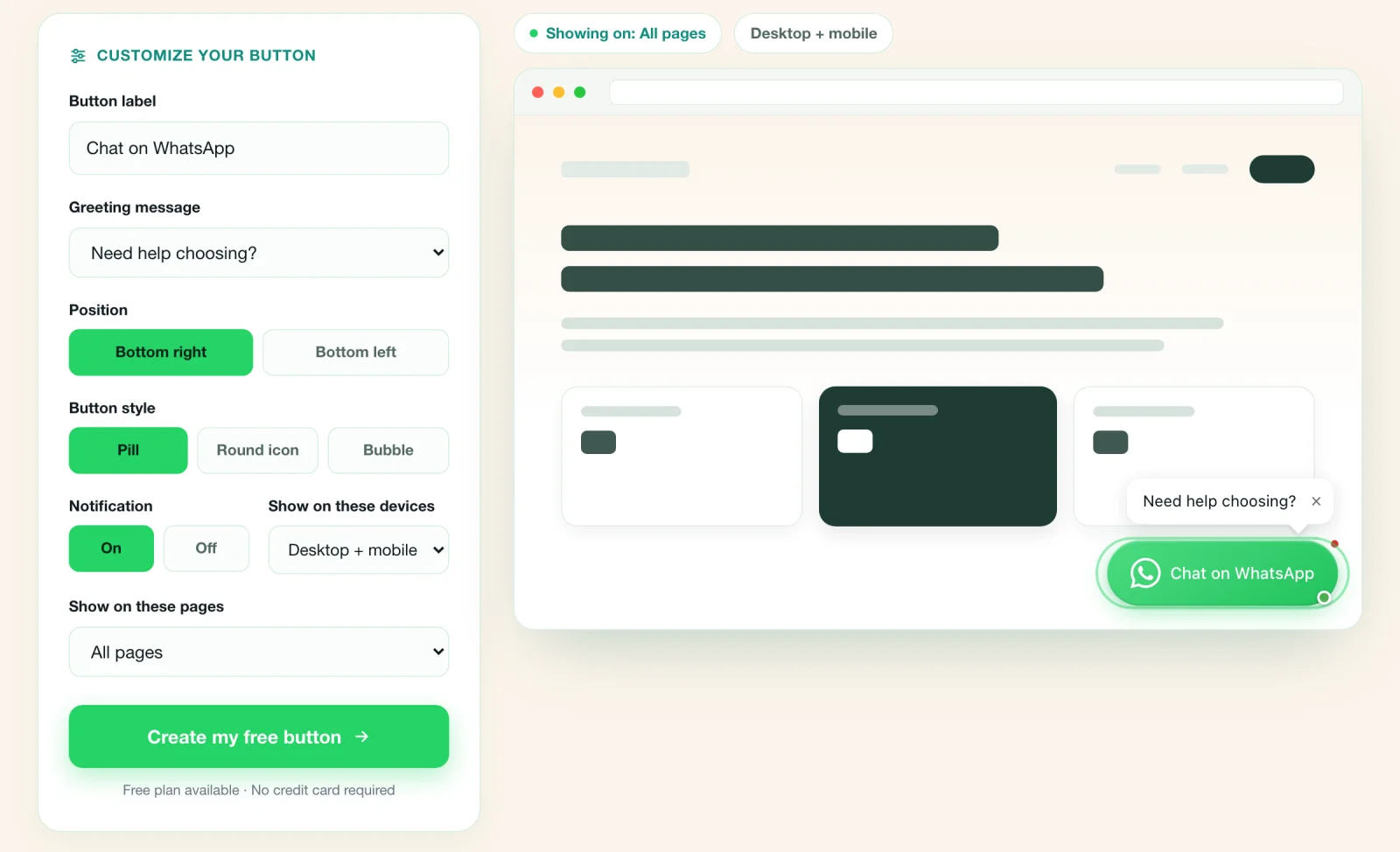
You can try these settings in the live button builder on our homepage before you sign up. Page rules need the Pro plan.
What WAButton adds on the Free plan:
- Your own design: colors, label, size and position, with a preview before it goes on your site.
- A greeting that appears after a delay, as visitors scroll, or when they move to leave.
- Business hours and holiday closures. When you are closed, the button shows an away message with your next opening time.
- An email when someone taps the button.
More than one contact, for example sales and support on different numbers, starts on the Starter plan at $9 a month. Every plan except Agency shows a small WAButton badge. The pricing page has the limits for each plan.
To install it, create a free account, enter your WhatsApp number, choose the design and greeting, then copy the code. It is one line:
<script src="https://widget.wabutton.app/v1.js" data-widget-id="YOUR_WIDGET_ID" async></script>
Paste it before </body>, or follow the guide for your platform below.
How much does a widget add to your page?
Owners ask this, so we measured our own. On November 8, 2026 we downloaded each file the button loads from widget.wabutton.app with gzip compression and added up the bytes transferred. The script on your page is 204 bytes, and it loads two more files, so the button costs 39,953 bytes, about 40 KB, before its panel opens. The chat panel is a separate file of 41,708 bytes that loads when the panel opens, either on a tap or through an auto-open you turn on. We did not count the small request that fetches your button's settings. The script is async, so it does not hold up the rest of your page. Your page speed score depends on everything else on the page, so run PageSpeed Insights before and after you add any widget, ours included.
A plain link or the HTML button above adds no script at all.
Let website visitors message you on WhatsApp.
Add a floating button, choose its colors and greeting, then reply in the WhatsApp app you already use.
Compare the three ways
| Plain link | HTML button | WAButton widget | |
|---|---|---|---|
| What you paste | A link | About 20 lines of code | One script tag |
| Stays on screen as visitors scroll | No | Yes | Yes |
| Change the design later | Your site's styles | Edit the code | In the dashboard |
| First message written for the visitor | Yes, with ?text= |
Yes, with ?text= |
Yes |
| Greeting on your page | No | No | Yes |
| Opening hours and away message | No | No | Yes, on Free |
| More than one contact | One link each | One button each | From Starter |
| You hear about a tap | No | No | By email, on Free |
| Cost | Free | Free | Free plan, paid plans from $9 a month |
Your platform: the setup guides
Each guide shows where the code goes on that platform:
- WordPress, without a plugin
- Shopify, and our longer Shopify button guide
- Wix
- Plain HTML and custom sites
The full list of setup guides covers the other platforms.
Test it before you trust it
Whichever way you choose, check these before you tell customers about it:
- Tap it on your phone. WhatsApp should open a chat with your business number and your first message in the text field.
- Click it on a computer. In our test on November 8, 2026, in a desktop browser, a wa.me link opened a WhatsApp page with the message and two choices: open the app or continue to WhatsApp Web.
- Check the number. One wrong digit sends your customers to a stranger.
- Ask someone who does not have your number saved to try it and send a message. Then check that it arrived.
- Open your site from the apps your customers use, such as Instagram or Facebook, and tap the button there. We did not test links opened inside other apps, so try yours.
- Test after closing time if you set hours, to see the away message.
What no method does
- No chat window inside your page. WhatsApp's click to chat opens a chat in WhatsApp. The conversation is in your app and the visitor's app, not on your website.
- A tap is not a message. The visitor can open WhatsApp and close it without sending anything. Any count of taps, ours included, tells you a chat was opened, not that a message was sent.
- Your number is not hidden. It is in the link. WhatsApp is rolling out business usernames gradually, and says a phone number is still required, your business phone number stays visible on your profile, and customers who have your number can still use it. The page mentions sharing a direct link but not its format, so the links here use your number.
- The visitor needs WhatsApp. Without the app, the desktop page we tested offers WhatsApp Web or a download.
If you are not sure where to start, put a plain link on your contact page today. You can move to a button or a widget later, and the link keeps working.
Frequently asked questions
Can I add WhatsApp to my website for free?
Yes. A wa.me link and an HTML button cost nothing. WAButton's Free plan gives you one button and one contact, and paid plans add more contacts and more buttons.
Do I need a plugin?
No. A link or an HTML button is plain HTML, and a widget is one script tag. The setup guides show where the code goes on WordPress, Shopify, Wix and plain HTML sites.
Can visitors chat inside my website?
No. Every method opens WhatsApp, on the visitor's phone or computer, and the conversation happens there. You reply in your WhatsApp app.
Will the button show my phone number?
Yes. Your number is part of the link, and WhatsApp shows your business phone number on your business profile, even if you set up a username.
Does it work on mobile and desktop?
WhatsApp says click to chat works on phones and on WhatsApp Web. On a computer, the link opens a WhatsApp page where the visitor chooses the app or WhatsApp Web.
Sources
Let website visitors message you on WhatsApp.
Add a floating button, choose its colors and greeting, then reply in the WhatsApp app you already use.
WAButton is a website button. We do not sell WhatsApp API access or a shared inbox, so nothing here depends on you buying them.
Written by WAButton Team